 Glimmer
Download Glimmer for Mac
Download Glimmer, a free spiritual life coach for Mac. Start checking in right away with no account required.
8 MB. Requires macOS 15 or later, on Apple silicon or Intel.
New in 1.0.14: Horizontal nature films bring gentle full-color movement to Glimmer’s reading gallery.
Signed by Protomota and notarized by Apple. Updates are signed too.
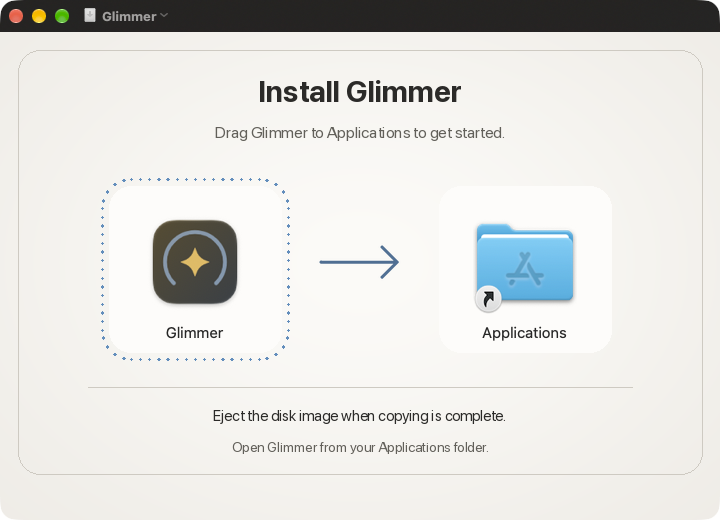
How to install Glimmer
- Open the disk image. Open
Glimmer-1.0.14.dmgin Downloads, drag Glimmer onto Applications, then eject the disk image. - Launch Glimmer from Applications. If macOS asks for confirmation, choose Open.
- Follow the short setup. Glimmer asks what you want to notice, then you log your first moment.
- Turn on iCloud sync if you want it. Open Settings, then iCloud Sync, to keep your journal in step across your devices.
Updates
Glimmer checks this site for new versions and asks before installing one. You can also choose Glimmer → Check for Updates… in the menu bar.
iPhone and iPad
Coming soon on the App Store.
Verify your download
In Terminal, run shasum -a 256 ~/Downloads/Glimmer-1.0.14.dmg and compare the result with this SHA-256 checksum.
f2afdc79fc04d3100e61cb69fbe889a58eb8314b24ff32a422a1e6d5a1e29d1b
Need a hand? Glimmer support covers installing, syncing and backups.
One newsletter.
All of Protomota.
Product updates and notes from the things I’m building. Join only if you want to.
Join the Protomota newsletterMade for small wins.
Fueled by coffee.
Like where Glimmer is going? A coffee is a small way to support the person behind it.
Buy me a coffeeTips are optional. Glimmer is free.
Glimmer feedback
Report a bug, suggest a feature, or tell us how Glimmer is working for you.
Send feedback